Geometry Containers
The multi module provides specialized geometry containers. A container is a holder object that stores a collection
of other objects, i.e. its elements. In NURBS-Python, containers can be generated as a result of
A geometric operation, such as splitting
File import, e.g. reading a file or a set of files containing multiple surfaces
The multi module contains the following classes:
AbstractContainerabstract base class for containersCurveContainerfor storing multiple curvesSurfaceContainerfor storing multiple surfacesVolumeContainerfor storing multiple volumes
How to Use
These containers can be used for many purposes, such as visualization of a multi-component geometry or file export. For instance, the following figure shows a heart valve with 3 leaflets:
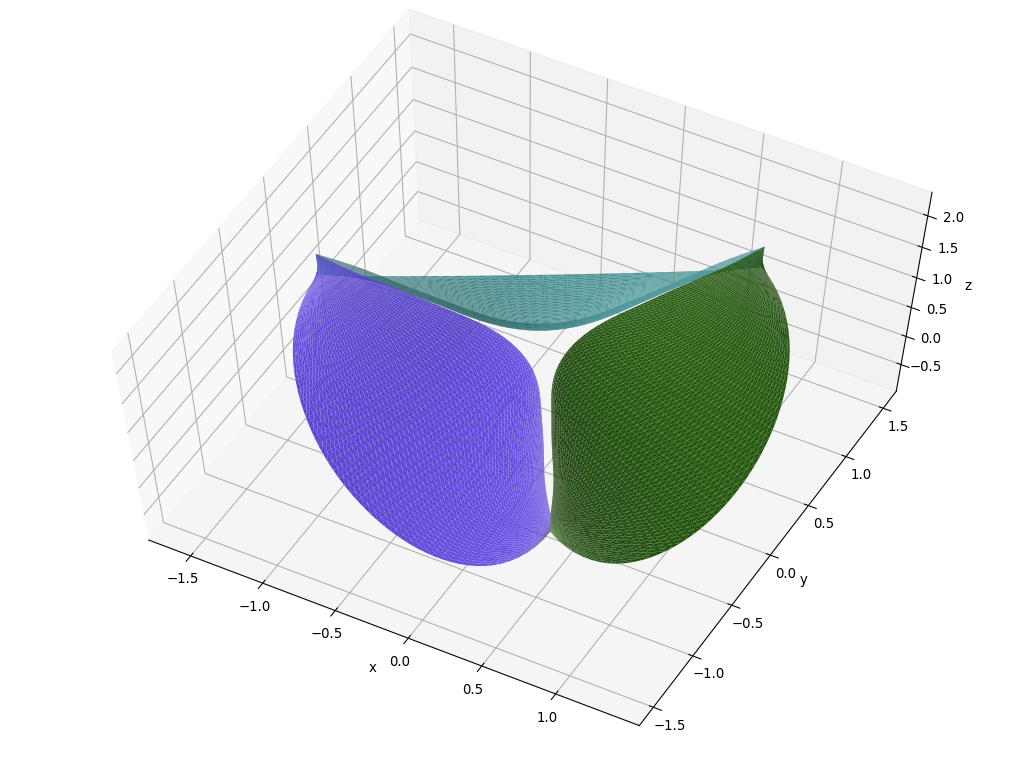
Each leaflet is a NURBS surface added to a SurfaceContainer and rendered via Matplotlib visualization
module. It is possible to input a list of colors to the render method, otherwise it will automatically pick an
arbitrary color.
Inheritance Diagram
digraph inheritancebabde70081 { bgcolor=transparent; rankdir=LR; ratio=compress; size="8.0, 12.0"; "geomdl.abstract.GeomdlBase" [URL="module_abstract.html#geomdl.abstract.GeomdlBase",fillcolor=white,fontname="Vera Sans, DejaVu Sans, Liberation Sans, Arial, Helvetica, sans",fontsize=10,height=0.25,shape=box,style="setlinewidth(0.5),filled",target="_top",tooltip="Abstract base class for defining geomdl objects."]; "geomdl.multi.AbstractContainer" [URL="#geomdl.multi.AbstractContainer",fillcolor=white,fontname="Vera Sans, DejaVu Sans, Liberation Sans, Arial, Helvetica, sans",fontsize=10,height=0.25,shape=box,style="setlinewidth(0.5),filled",target="_top",tooltip="Abstract class for geometry containers."]; "geomdl.abstract.GeomdlBase" -> "geomdl.multi.AbstractContainer" [arrowsize=0.5,style="setlinewidth(0.5)"]; "geomdl.multi.CurveContainer" [URL="#geomdl.multi.CurveContainer",fillcolor=white,fontname="Vera Sans, DejaVu Sans, Liberation Sans, Arial, Helvetica, sans",fontsize=10,height=0.25,shape=box,style="setlinewidth(0.5),filled",target="_top",tooltip="Container class for storing multiple curves."]; "geomdl.multi.AbstractContainer" -> "geomdl.multi.CurveContainer" [arrowsize=0.5,style="setlinewidth(0.5)"]; "geomdl.multi.SurfaceContainer" [URL="#geomdl.multi.SurfaceContainer",fillcolor=white,fontname="Vera Sans, DejaVu Sans, Liberation Sans, Arial, Helvetica, sans",fontsize=10,height=0.25,shape=box,style="setlinewidth(0.5),filled",target="_top",tooltip="Container class for storing multiple surfaces."]; "geomdl.multi.AbstractContainer" -> "geomdl.multi.SurfaceContainer" [arrowsize=0.5,style="setlinewidth(0.5)"]; "geomdl.multi.VolumeContainer" [URL="#geomdl.multi.VolumeContainer",fillcolor=white,fontname="Vera Sans, DejaVu Sans, Liberation Sans, Arial, Helvetica, sans",fontsize=10,height=0.25,shape=box,style="setlinewidth(0.5),filled",target="_top",tooltip="Container class for storing multiple volumes."]; "geomdl.multi.AbstractContainer" -> "geomdl.multi.VolumeContainer" [arrowsize=0.5,style="setlinewidth(0.5)"]; }Abstract Container
- class geomdl.multi.AbstractContainer(*args, **kwargs)
Bases:
GeomdlBaseAbstract class for geometry containers.
This class implements Python Iterator Protocol and therefore any instance of this class can be directly used in a for loop.
This class provides the following properties:
- add(element)
Adds geometry objects to the container.
The input can be a single geometry, a list of geometry objects or a geometry container object.
- Parameters:
element – geometry object
- append(element)
Adds geometry objects to the container.
The input can be a single geometry, a list of geometry objects or a geometry container object.
- Parameters:
element – geometry object
- property bbox
Bounding box.
Please refer to the wiki for details on using this class member.
- Getter:
Gets the bounding box of all contained geometries
- property data
Returns a dict which contains the geometry data.
Please refer to the wiki for details on using this class member.
- property delta
Evaluation delta (for all parametric directions).
Evaluation delta corresponds to the step size. Decreasing the step size results in evaluation of more points. Therefore; smaller the delta value, smoother the shape.
The following figure illustrates the working principles of the delta property:
![\left[{{u_{start}},{u_{start}} + \delta ,({u_{start}} + \delta ) + \delta , \ldots ,{u_{end}}} \right]](_images/math/c9b9017a2c9a6e040e642f5fb0769f6e340d9639.png)
Please refer to the wiki for details on using this class member.
- Getter:
Gets the delta value
- Setter:
Sets the delta value
- property dimension
Spatial dimension.
Please refer to the wiki for details on using this class member.
- Getter:
Gets the spatial dimension, e.g. 2D, 3D, etc.
- Type:
int
- property evalpts
Evaluated points.
Since there are multiple geometry objects contained in the multi objects, the evaluated points will be returned in the format of list of individual evaluated points which is also a list of Cartesian coordinates.
The following code example illustrates these details:
1multi_obj = multi.SurfaceContainer()  # it can also be multi.CurveContainer()
2# Add geometries to multi_obj via multi_obj.add() method
3# Then, the following loop will print all the evaluated points of the Multi object
4for idx, mpt in enumerate(multi_obj.evalpts):
5    print("Shape", idx+1, "contains", len(mpt), "points. These points are:")
6    for pt in mpt:
7        line = ", ".join([str(p) for p in pt])
8        print(line)
Please refer to the wiki for details on using this class member.
- Getter:
Gets the evaluated points of all contained geometries
- property id
Object ID (as an integer).
Please refer to the wiki for details on using this class member.
- Getter:
Gets the object ID
- Setter:
Sets the object ID
- Type:
int
- property name
Object name (as a string)
Please refer to the wiki for details on using this class member.
- Getter:
Gets the object name
- Setter:
Sets the object name
- Type:
str
- property opt
Dictionary for storing custom data in the current geometry object.
optis a wrapper to a dict in key => value format, where key is string, value is any Python object. You can useoptproperty to store custom data inside the geometry object. For instance:geom.opt = ["face_id", 4] # creates "face_id" key and sets its value to an integer geom.opt = ["contents", "data values"] # creates "face_id" key and sets its value to a string print(geom.opt) # will print: {'face_id': 4, 'contents': 'data values'} del geom.opt # deletes the contents of the hash map print(geom.opt) # will print: {} geom.opt = ["body_id", 1] # creates "body_id" key and sets its value to 1 geom.opt = ["body_id", 12] # changes the value of "body_id" to 12 print(geom.opt) # will print: {'body_id': 12} geom.opt = ["body_id", None] # deletes "body_id" print(geom.opt) # will print: {}
Please refer to the wiki for details on using this class member.
- Getter:
Gets the dict
- Setter:
Adds key and value pair to the dict
- Deleter:
Deletes the contents of the dict
- opt_get(value)
Safely query for the value from the
optproperty.- Parameters:
value (str) – a key in the
optproperty- Returns:
the corresponding value, if the key exists.
None, otherwise.
- property pdimension
Parametric dimension.
Please refer to the wiki for details on using this class member.
- Getter:
Gets the parametric dimension
- Type:
int
- abstractmethod render(**kwargs)
Renders plots using the visualization component.
Note
This is an abstract method and it must be implemented in the subclass.
- reset()
Resets the cache.
- property sample_size
Sample size (for all parametric directions).
Sample size defines the number of points to evaluate. It also sets the
deltaproperty.The following figure illustrates the working principles of sample size property:
![\underbrace {\left[ {{u_{start}}, \ldots ,{u_{end}}} \right]}_{{n_{sample}}}](_images/math/1c947ab28078413a0019013d581041db4c6d1d66.png)
Please refer to the wiki for details on using this class member.
- Getter:
Gets sample size
- Setter:
Sets sample size
Curve Container
- class geomdl.multi.CurveContainer(*args, **kwargs)
Bases:
AbstractContainerContainer class for storing multiple curves.
This class implements Python Iterator Protocol and therefore any instance of this class can be directly used in a for loop.
This class provides the following properties:
The following code example illustrates the usage of the Python properties:
# Create a multi-curve container instance
mcrv = multi.CurveContainer()

# Add single or multi curves to the multi container using mcrv.add() command
# Addition operator, e.g. mcrv1 + mcrv2, also works

# Set the evaluation delta of the multi-curve
mcrv.delta = 0.05

# Get the evaluated points
curve_points = mcrv.evalpts
- add(element)
Adds geometry objects to the container.
The input can be a single geometry, a list of geometry objects or a geometry container object.
- Parameters:
element – geometry object
- append(element)
Adds geometry objects to the container.
The input can be a single geometry, a list of geometry objects or a geometry container object.
- Parameters:
element – geometry object
- property bbox
Bounding box.
Please refer to the wiki for details on using this class member.
- Getter:
Gets the bounding box of all contained geometries
- property data
Returns a dict which contains the geometry data.
Please refer to the wiki for details on using this class member.
- property delta
Evaluation delta (for all parametric directions).
Evaluation delta corresponds to the step size. Decreasing the step size results in evaluation of more points. Therefore; smaller the delta value, smoother the shape.
The following figure illustrates the working principles of the delta property:
Please refer to the wiki for details on using this class member.
- Getter:
Gets the delta value
- Setter:
Sets the delta value
- property dimension
Spatial dimension.
Please refer to the wiki for details on using this class member.
- Getter:
Gets the spatial dimension, e.g. 2D, 3D, etc.
- Type:
int
- property evalpts
Evaluated points.
Since there are multiple geometry objects contained in the multi objects, the evaluated points will be returned in the format of list of individual evaluated points which is also a list of Cartesian coordinates.
The following code example illustrates these details:
1multi_obj = multi.SurfaceContainer()  # it can also be multi.CurveContainer()
2# Add geometries to multi_obj via multi_obj.add() method
3# Then, the following loop will print all the evaluated points of the Multi object
4for idx, mpt in enumerate(multi_obj.evalpts):
5    print("Shape", idx+1, "contains", len(mpt), "points. These points are:")
6    for pt in mpt:
7        line = ", ".join([str(p) for p in pt])
8        print(line)
Please refer to the wiki for details on using this class member.
- Getter:
Gets the evaluated points of all contained geometries
- property id
Object ID (as an integer).
Please refer to the wiki for details on using this class member.
- Getter:
Gets the object ID
- Setter:
Sets the object ID
- Type:
int
- property name
Object name (as a string)
Please refer to the wiki for details on using this class member.
- Getter:
Gets the object name
- Setter:
Sets the object name
- Type:
str
- property opt
Dictionary for storing custom data in the current geometry object.
optis a wrapper to a dict in key => value format, where key is string, value is any Python object. You can useoptproperty to store custom data inside the geometry object. For instance:geom.opt = ["face_id", 4] # creates "face_id" key and sets its value to an integer geom.opt = ["contents", "data values"] # creates "face_id" key and sets its value to a string print(geom.opt) # will print: {'face_id': 4, 'contents': 'data values'} del geom.opt # deletes the contents of the hash map print(geom.opt) # will print: {} geom.opt = ["body_id", 1] # creates "body_id" key and sets its value to 1 geom.opt = ["body_id", 12] # changes the value of "body_id" to 12 print(geom.opt) # will print: {'body_id': 12} geom.opt = ["body_id", None] # deletes "body_id" print(geom.opt) # will print: {}
Please refer to the wiki for details on using this class member.
- Getter:
Gets the dict
- Setter:
Adds key and value pair to the dict
- Deleter:
Deletes the contents of the dict
- opt_get(value)
Safely query for the value from the
optproperty.- Parameters:
value (str) – a key in the
optproperty- Returns:
the corresponding value, if the key exists.
None, otherwise.
- property pdimension
Parametric dimension.
Please refer to the wiki for details on using this class member.
- Getter:
Gets the parametric dimension
- Type:
int
- render(**kwargs)
Renders the curves.
The visualization component must be set using
visproperty before calling this method.Keyword Arguments:
cpcolor: sets the color of the control points gridevalcolor: sets the color of the surfacefilename: saves the plot with the input nameplot: controls plot window visibility. Default: Trueanimate: activates animation (if supported). Default: Falsedelta: if True, the evaluation delta of the container object will be used. Default: Truereset_names: resets the name of the curves inside the container. Default: False
The
cpcolorandevalcolorarguments can be a string or a list of strings corresponding to the color values. Both arguments are processed separately, e.g.cpcolorcan be a string whereasevalcolorcan be a list or a tuple, or vice versa. A single string value sets the color to the same value. List input allows customization over the color values. If none provided, a random color will be selected.The
plotargument is useful when you would like to work on the command line without any window context. Ifplotflag is False, this method saves the plot as an image file (.png file where possible) and disables plot window popping out. If you don’t provide a file name, the name of the image file will be pulled from the configuration class.
- reset()
Resets the cache.
- property sample_size
Sample size (for all parametric directions).
Sample size defines the number of points to evaluate. It also sets the
deltaproperty.The following figure illustrates the working principles of sample size property:
Please refer to the wiki for details on using this class member.
- Getter:
Gets sample size
- Setter:
Sets sample size
Surface Container
- class geomdl.multi.SurfaceContainer(*args, **kwargs)
Bases:
AbstractContainerContainer class for storing multiple surfaces.
This class implements Python Iterator Protocol and therefore any instance of this class can be directly used in a for loop.
This class provides the following properties:
type= container
The following code example illustrates the usage of these Python properties:
# Create a multi-surface container instance
msurf = multi.SurfaceContainer()

# Add single or multi surfaces to the multi container using msurf.add() command
# Addition operator, e.g. msurf1 + msurf2, also works

# Set the evaluation delta of the multi-surface
msurf.delta = 0.05

# Get the evaluated points
surface_points = msurf.evalpts
- add(element)
Adds geometry objects to the container.
The input can be a single geometry, a list of geometry objects or a geometry container object.
- Parameters:
element – geometry object
- append(element)
Adds geometry objects to the container.
The input can be a single geometry, a list of geometry objects or a geometry container object.
- Parameters:
element – geometry object
- property bbox
Bounding box.
Please refer to the wiki for details on using this class member.
- Getter:
Gets the bounding box of all contained geometries
- property data
Returns a dict which contains the geometry data.
Please refer to the wiki for details on using this class member.
- property delta
Evaluation delta (for all parametric directions).
Evaluation delta corresponds to the step size. Decreasing the step size results in evaluation of more points. Therefore; smaller the delta value, smoother the shape.
The following figure illustrates the working principles of the delta property:
Please refer to the wiki for details on using this class member.
- Getter:
Gets the delta value
- Setter:
Sets the delta value
- property delta_u
Evaluation delta for the u-direction.
Evaluation delta corresponds to the step size. Decreasing the step size results in evaluation of more points. Therefore; smaller the delta, smoother the shape.
Please note that
delta_uandsample_size_uproperties correspond to the same variable with different descriptions. Therefore, settingdelta_uwill also setsample_size_u.Please refer to the wiki for details on using this class member.
- Getter:
Gets the delta value for the u-direction
- Setter:
Sets the delta value for the u-direction
- Type:
float
- property delta_v
Evaluation delta for the v-direction.
Evaluation delta corresponds to the step size. Decreasing the step size results in evaluation of more points. Therefore; smaller the delta, smoother the shape.
Please note that
delta_vandsample_size_vproperties correspond to the same variable with different descriptions. Therefore, settingdelta_vwill also setsample_size_v.Please refer to the wiki for details on using this class member.
- Getter:
Gets the delta value for the v-direction
- Setter:
Sets the delta value for the v-direction
- Type:
float
- property dimension
Spatial dimension.
Please refer to the wiki for details on using this class member.
- Getter:
Gets the spatial dimension, e.g. 2D, 3D, etc.
- Type:
int
- property evalpts
Evaluated points.
Since there are multiple geometry objects contained in the multi objects, the evaluated points will be returned in the format of list of individual evaluated points which is also a list of Cartesian coordinates.
The following code example illustrates these details:
1multi_obj = multi.SurfaceContainer()  # it can also be multi.CurveContainer()
2# Add geometries to multi_obj via multi_obj.add() method
3# Then, the following loop will print all the evaluated points of the Multi object
4for idx, mpt in enumerate(multi_obj.evalpts):
5    print("Shape", idx+1, "contains", len(mpt), "points. These points are:")
6    for pt in mpt:
7        line = ", ".join([str(p) for p in pt])
8        print(line)
Please refer to the wiki for details on using this class member.
- Getter:
Gets the evaluated points of all contained geometries
- property faces
Faces (triangles, quads, etc.) generated by the tessellation operation.
If the tessellation component is set to None, the result will be an empty list.
- Getter:
Gets the faces
- property id
Object ID (as an integer).
Please refer to the wiki for details on using this class member.
- Getter:
Gets the object ID
- Setter:
Sets the object ID
- Type:
int
- property name
Object name (as a string)
Please refer to the wiki for details on using this class member.
- Getter:
Gets the object name
- Setter:
Sets the object name
- Type:
str
- property opt
Dictionary for storing custom data in the current geometry object.
optis a wrapper to a dict in key => value format, where key is string, value is any Python object. You can useoptproperty to store custom data inside the geometry object. For instance:geom.opt = ["face_id", 4] # creates "face_id" key and sets its value to an integer geom.opt = ["contents", "data values"] # creates "face_id" key and sets its value to a string print(geom.opt) # will print: {'face_id': 4, 'contents': 'data values'} del geom.opt # deletes the contents of the hash map print(geom.opt) # will print: {} geom.opt = ["body_id", 1] # creates "body_id" key and sets its value to 1 geom.opt = ["body_id", 12] # changes the value of "body_id" to 12 print(geom.opt) # will print: {'body_id': 12} geom.opt = ["body_id", None] # deletes "body_id" print(geom.opt) # will print: {}
Please refer to the wiki for details on using this class member.
- Getter:
Gets the dict
- Setter:
Adds key and value pair to the dict
- Deleter:
Deletes the contents of the dict
- opt_get(value)
Safely query for the value from the
optproperty.- Parameters:
value (str) – a key in the
optproperty- Returns:
the corresponding value, if the key exists.
None, otherwise.
- property pdimension
Parametric dimension.
Please refer to the wiki for details on using this class member.
- Getter:
Gets the parametric dimension
- Type:
int
- render(**kwargs)
Renders the surfaces.
The visualization component must be set using
visproperty before calling this method.- Keyword Arguments:
cpcolor: sets the color of the control points gridsevalcolor: sets the color of the surfacefilename: saves the plot with the input nameplot: controls plot window visibility. Default: Trueanimate: activates animation (if supported). Default: Falsecolormap: sets the colormap of the surfacesdelta: if True, the evaluation delta of the container object will be used. Default: Truereset_names: resets the name of the surfaces inside the container. Default: Falsenum_procs: number of concurrent processes for rendering the surfaces. Default: 1
The
cpcolorandevalcolorarguments can be a string or a list of strings corresponding to the color values. Both arguments are processed separately, e.g.cpcolorcan be a string whereasevalcolorcan be a list or a tuple, or vice versa. A single string value sets the color to the same value. List input allows customization over the color values. If none provided, a random color will be selected.The
plotargument is useful when you would like to work on the command line without any window context. Ifplotflag is False, this method saves the plot as an image file (.png file where possible) and disables plot window popping out. If you don’t provide a file name, the name of the image file will be pulled from the configuration class.Please note that
colormapargument can only work with visualization classes that support colormaps. As an example, please seeVisMPL.VisSurfTriangle()class documentation. This method expects multiple colormap inputs as a list or tuple, preferable the input list size is the same as the number of surfaces contained in the class. In the case of number of surfaces is bigger than number of input colormaps, this method will automatically assign a random color for the remaining surfaces.
- reset()
Resets the cache.
- property sample_size
Sample size (for all parametric directions).
Sample size defines the number of points to evaluate. It also sets the
deltaproperty.The following figure illustrates the working principles of sample size property:
Please refer to the wiki for details on using this class member.
- Getter:
Gets sample size
- Setter:
Sets sample size
- property sample_size_u
Sample size for the u-direction.
Sample size defines the number of points to evaluate. It also sets the
delta_uproperty.Please refer to the wiki for details on using this class member.
- Getter:
Gets sample size for the u-direction
- Setter:
Sets sample size for the u-direction
- Type:
int
- property sample_size_v
Sample size for the v-direction.
Sample size defines the number of points to evaluate. It also sets the
delta_vproperty.Please refer to the wiki for details on using this class member.
- Getter:
Gets sample size for the v-direction
- Setter:
Sets sample size for the v-direction
- Type:
int
- tessellate(**kwargs)
Tessellates the surfaces inside the container.
Keyword arguments are directly passed to the tessellation component.
The following code snippet illustrates getting the vertices and faces of the surfaces inside the container:
 1# Tessellate the surfaces inside the container
 2surf_container.tessellate()
 3
 4# Vertices and faces are stored inside the tessellator component
 5tsl = surf_container.tessellator
 6
 7# Loop through all tessellator components
 8for t in tsl:
 9    # Get the vertices
10    vertices = t.tessellator.vertices
11    # Get the faces (triangles, quads, etc.)
12    faces = t.tessellator.faces
- Keyword Arguments:
num_procs: number of concurrent processes for tessellating the surfaces. Default: 1delta: if True, the evaluation delta of the container object will be used. Default: Trueforce: flag to force tessellation. Default: False
- property tessellator
Tessellation component of the surfaces inside the container.
Please refer to Tessellation documentation for details.
1from geomdl import multi
2from geomdl import tessellate
3
4# Create the surface container
5surf_container = multi.SurfaceContainer(surf_list)
6
7# Set tessellator component
8surf_container.tessellator = tessellate.TrimTessellate()
- Getter:
gets the tessellation component
- Setter:
sets the tessellation component
- property type
Geometry type
Please refer to the wiki for details on using this class member.
- Getter:
Gets the geometry type
- Type:
str
- property vertices
Vertices generated by the tessellation operation.
If the tessellation component is set to None, the result will be an empty list.
- Getter:
Gets the vertices
Volume Container
- class geomdl.multi.VolumeContainer(*args, **kwargs)
Bases:
AbstractContainerContainer class for storing multiple volumes.
This class implements Python Iterator Protocol and therefore any instance of this class can be directly used in a for loop.
This class provides the following properties:
The following code example illustrates the usage of these Python properties:
# Create a multi-volume container instance
mvol = multi.VolumeContainer()

# Add single or multi volumes to the multi container using mvol.add() command
# Addition operator, e.g. mvol1 + mvol2, also works

# Set the evaluation delta of the multi-volume
mvol.delta = 0.05

# Get the evaluated points
volume_points = mvol.evalpts
- add(element)
Adds geometry objects to the container.
The input can be a single geometry, a list of geometry objects or a geometry container object.
- Parameters:
element – geometry object
- append(element)
Adds geometry objects to the container.
The input can be a single geometry, a list of geometry objects or a geometry container object.
- Parameters:
element – geometry object
- property bbox
Bounding box.
Please refer to the wiki for details on using this class member.
- Getter:
Gets the bounding box of all contained geometries
- property data
Returns a dict which contains the geometry data.
Please refer to the wiki for details on using this class member.
- property delta
Evaluation delta (for all parametric directions).
Evaluation delta corresponds to the step size. Decreasing the step size results in evaluation of more points. Therefore; smaller the delta value, smoother the shape.
The following figure illustrates the working principles of the delta property:
Please refer to the wiki for details on using this class member.
- Getter:
Gets the delta value
- Setter:
Sets the delta value
- property delta_u
Evaluation delta for the u-direction.
Evaluation delta corresponds to the step size. Decreasing the step size results in evaluation of more points. Therefore; smaller the delta, smoother the shape.
Please note that
delta_uandsample_size_uproperties correspond to the same variable with different descriptions. Therefore, settingdelta_uwill also setsample_size_u.Please refer to the wiki for details on using this class member.
- Getter:
Gets the delta value for the u-direction
- Setter:
Sets the delta value for the u-direction
- Type:
float
- property delta_v
Evaluation delta for the v-direction.
Evaluation delta corresponds to the step size. Decreasing the step size results in evaluation of more points. Therefore; smaller the delta, smoother the shape.
Please note that
delta_vandsample_size_vproperties correspond to the same variable with different descriptions. Therefore, settingdelta_vwill also setsample_size_v.Please refer to the wiki for details on using this class member.
- Getter:
Gets the delta value for the v-direction
- Setter:
Sets the delta value for the v-direction
- Type:
float
- property delta_w
Evaluation delta for the w-direction.
Evaluation delta corresponds to the step size. Decreasing the step size results in evaluation of more points. Therefore; smaller the delta, smoother the shape.
Please note that
delta_wandsample_size_wproperties correspond to the same variable with different descriptions. Therefore, settingdelta_wwill also setsample_size_w.Please refer to the wiki for details on using this class member.
- Getter:
Gets the delta value for the w-direction
- Setter:
Sets the delta value for the w-direction
- Type:
float
- property dimension
Spatial dimension.
Please refer to the wiki for details on using this class member.
- Getter:
Gets the spatial dimension, e.g. 2D, 3D, etc.
- Type:
int
- property evalpts
Evaluated points.
Since there are multiple geometry objects contained in the multi objects, the evaluated points will be returned in the format of list of individual evaluated points which is also a list of Cartesian coordinates.
The following code example illustrates these details:
1multi_obj = multi.SurfaceContainer()  # it can also be multi.CurveContainer()
2# Add geometries to multi_obj via multi_obj.add() method
3# Then, the following loop will print all the evaluated points of the Multi object
4for idx, mpt in enumerate(multi_obj.evalpts):
5    print("Shape", idx+1, "contains", len(mpt), "points. These points are:")
6    for pt in mpt:
7        line = ", ".join([str(p) for p in pt])
8        print(line)
Please refer to the wiki for details on using this class member.
- Getter:
Gets the evaluated points of all contained geometries
- property id
Object ID (as an integer).
Please refer to the wiki for details on using this class member.
- Getter:
Gets the object ID
- Setter:
Sets the object ID
- Type:
int
- property name
Object name (as a string)
Please refer to the wiki for details on using this class member.
- Getter:
Gets the object name
- Setter:
Sets the object name
- Type:
str
- property opt
Dictionary for storing custom data in the current geometry object.
optis a wrapper to a dict in key => value format, where key is string, value is any Python object. You can useoptproperty to store custom data inside the geometry object. For instance:geom.opt = ["face_id", 4] # creates "face_id" key and sets its value to an integer geom.opt = ["contents", "data values"] # creates "face_id" key and sets its value to a string print(geom.opt) # will print: {'face_id': 4, 'contents': 'data values'} del geom.opt # deletes the contents of the hash map print(geom.opt) # will print: {} geom.opt = ["body_id", 1] # creates "body_id" key and sets its value to 1 geom.opt = ["body_id", 12] # changes the value of "body_id" to 12 print(geom.opt) # will print: {'body_id': 12} geom.opt = ["body_id", None] # deletes "body_id" print(geom.opt) # will print: {}
Please refer to the wiki for details on using this class member.
- Getter:
Gets the dict
- Setter:
Adds key and value pair to the dict
- Deleter:
Deletes the contents of the dict
- opt_get(value)
Safely query for the value from the
optproperty.- Parameters:
value (str) – a key in the
optproperty- Returns:
the corresponding value, if the key exists.
None, otherwise.
- property pdimension
Parametric dimension.
Please refer to the wiki for details on using this class member.
- Getter:
Gets the parametric dimension
- Type:
int
- render(**kwargs)
Renders the volumes.
The visualization component must be set using
visproperty before calling this method.- Keyword Arguments:
cpcolor: sets the color of the control points plotevalcolor: sets the color of the volumefilename: saves the plot with the input nameplot: controls plot window visibility. Default: Trueanimate: activates animation (if supported). Default: Falsedelta: if True, the evaluation delta of the container object will be used. Default: Truereset_names: resets the name of the volumes inside the container. Default: Falsegrid_size: grid size for voxelization. Default: (16, 16, 16)num_procs: number of concurrent processes for voxelization. Default: 1
The
cpcolorandevalcolorarguments can be a string or a list of strings corresponding to the color values. Both arguments are processed separately, e.g.cpcolorcan be a string whereasevalcolorcan be a list or a tuple, or vice versa. A single string value sets the color to the same value. List input allows customization over the color values. If none provided, a random color will be selected.The
plotargument is useful when you would like to work on the command line without any window context. Ifplotflag is False, this method saves the plot as an image file (.png file where possible) and disables plot window popping out. If you don’t provide a file name, the name of the image file will be pulled from the configuration class.
- reset()
Resets the cache.
- property sample_size
Sample size (for all parametric directions).
Sample size defines the number of points to evaluate. It also sets the
deltaproperty.The following figure illustrates the working principles of sample size property:
Please refer to the wiki for details on using this class member.
- Getter:
Gets sample size
- Setter:
Sets sample size
- property sample_size_u
Sample size for the u-direction.
Sample size defines the number of points to evaluate. It also sets the
delta_uproperty.Please refer to the wiki for details on using this class member.
- Getter:
Gets sample size for the u-direction
- Setter:
Sets sample size for the u-direction
- Type:
int
- property sample_size_v
Sample size for the v-direction.
Sample size defines the number of points to evaluate. It also sets the
delta_vproperty.Please refer to the wiki for details on using this class member.
- Getter:
Gets sample size for the v-direction
- Setter:
Sets sample size for the v-direction
- Type:
int
- property sample_size_w
Sample size for the w-direction.
Sample size defines the number of points to evaluate. It also sets the
delta_wproperty.Please refer to the wiki for details on using this class member.
- Getter:
Gets sample size for the w-direction
- Setter:
Sets sample size for the w-direction
- Type:
int